For macOS · free and open source

Updates that fix
their own errors

omega updates and cleans your Mac like topgrade and Mole, then reads every failure, finds the cause and fixes the config. You pick what it does from a card and approve anything risky. A routine run costs under one cent, or nothing on a local model.

brew install lcajigasm/omega/omega

43 maintenance steps · cloud or local models · 5 interface languages · MIT licensed

Works with

  • Anthropic
  • OpenAI
  • OpenRouter
  • OpenCode Zen
  • Ollama
  • LM Studio

omega · full

Ω omega anthropic · claude-haiku-5-5 · task: full

✓ system_info

✓ brew update && brew upgrade · 2m14s

✗ exit 1 pipx upgrade-all

│ Error: python@3.12 not found

↑ Switched to claude-sonnet-5-5 to diagnose the failure

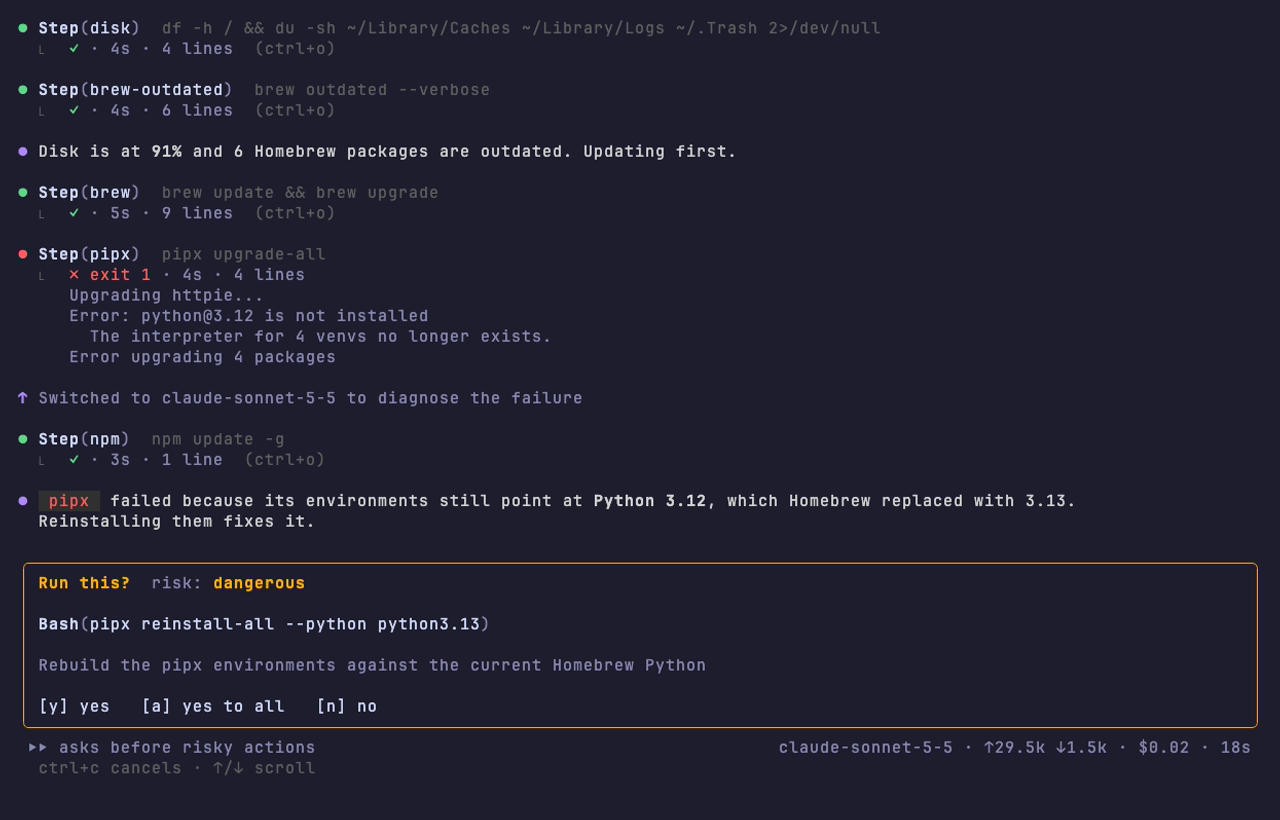
The pipx environments point at a Python that Homebrew removed. Reinstalling them against the current one.

? pipx reinstall-all → approved

✓ pipx reinstall-all · 41s

✓ brew cleanup --prune=all · 12s

Done: 23 packages updated, 6.4 GB freed, pipx repaired and noted for next time.

⏵⏵ asks before risky actions ↑94k ↓4.6k · $0.0061 · 3m12s
An illustrative omega run: an update step fails, omega diagnoses it, asks for approval, fixes it and summarises.

Your update script fails.
Then you debug it all evening.

Running topgrade and Mole by hand

  • A step fails and the run moves on with a red line you have to scroll back to
  • You search the error, edit topgrade.toml and launch everything again
  • A cask asks for a password halfway through and the run hangs
  • The same pipx failure comes back next month

Running omega

  • It reads the failure the moment it happens and works out the cause
  • It applies the smallest fix, retries once and moves on if it still fails
  • Commands run without a prompt, so nothing waits on a password you cannot see
  • It writes down what it learned and starts there next time

Your Mac stays current and clean. You only step in when something could be lost.

What changes when an agent runs your maintenance

Failures get fixed, not just reported

omega reads the output, checks the config behind it and retries with the fix. It also reads the system logs for crash loops and failing agents, and offers to install what a cleanup needs.

You pick, it does

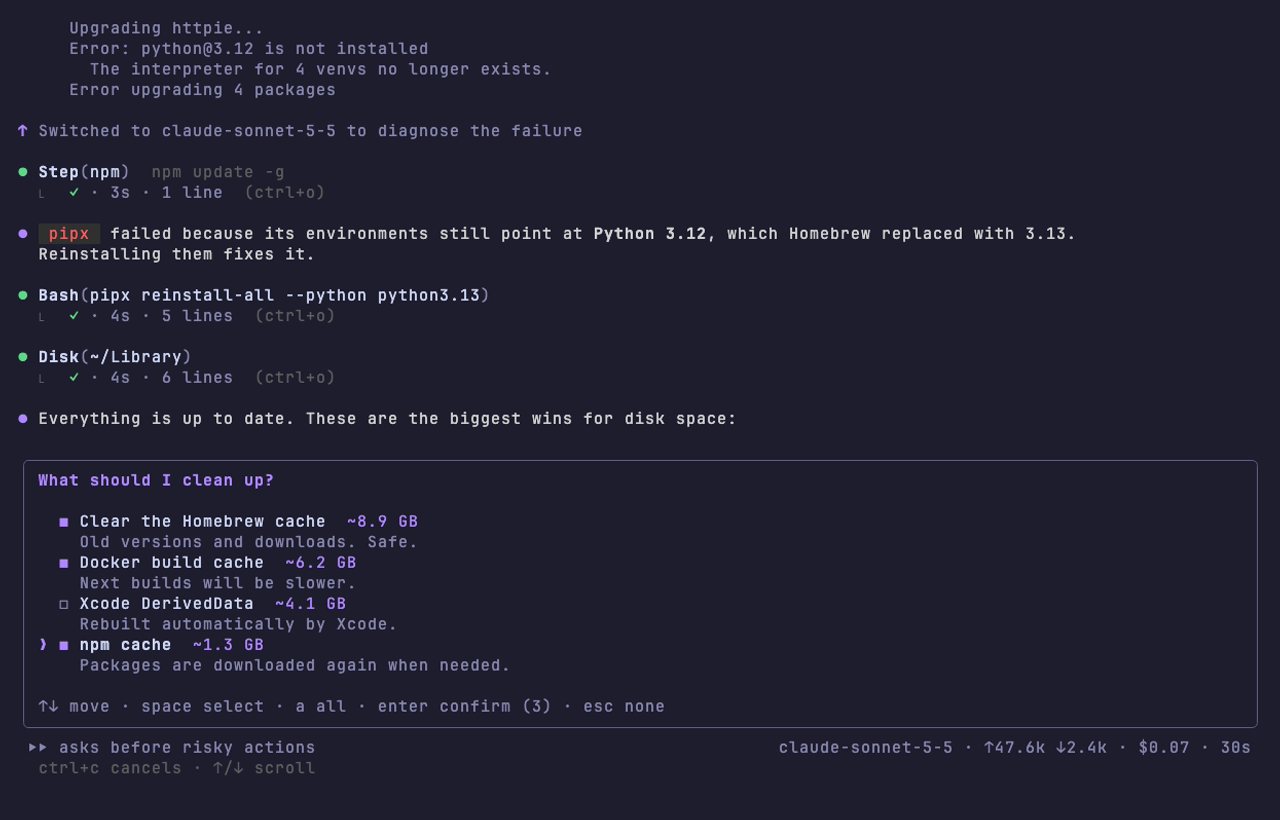
Recommendations arrive on a card with their impact. Tick one or several, and omega carries out exactly those. Nothing else.

Small model first

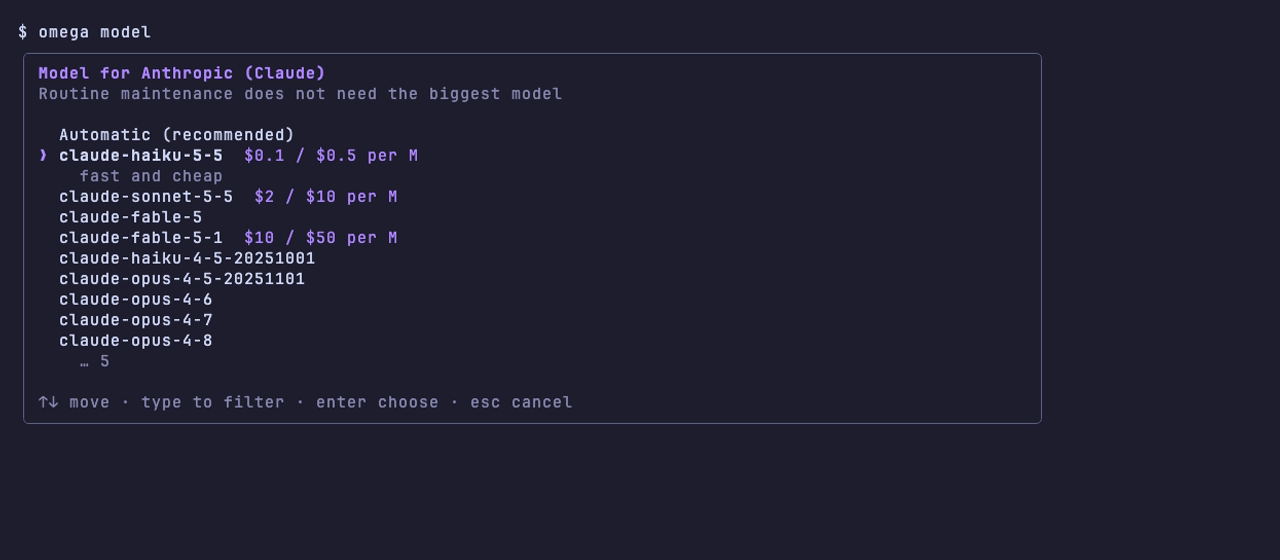
Routine work runs on Claude Haiku or GPT mini. omega switches to a stronger model only when a step fails, and shows the cost as it goes.

Tunes your tools with current docs

omega tune reviews the config of what you have installed, reads the official documentation on the web and proposes improvements with their source.

Docker back under control

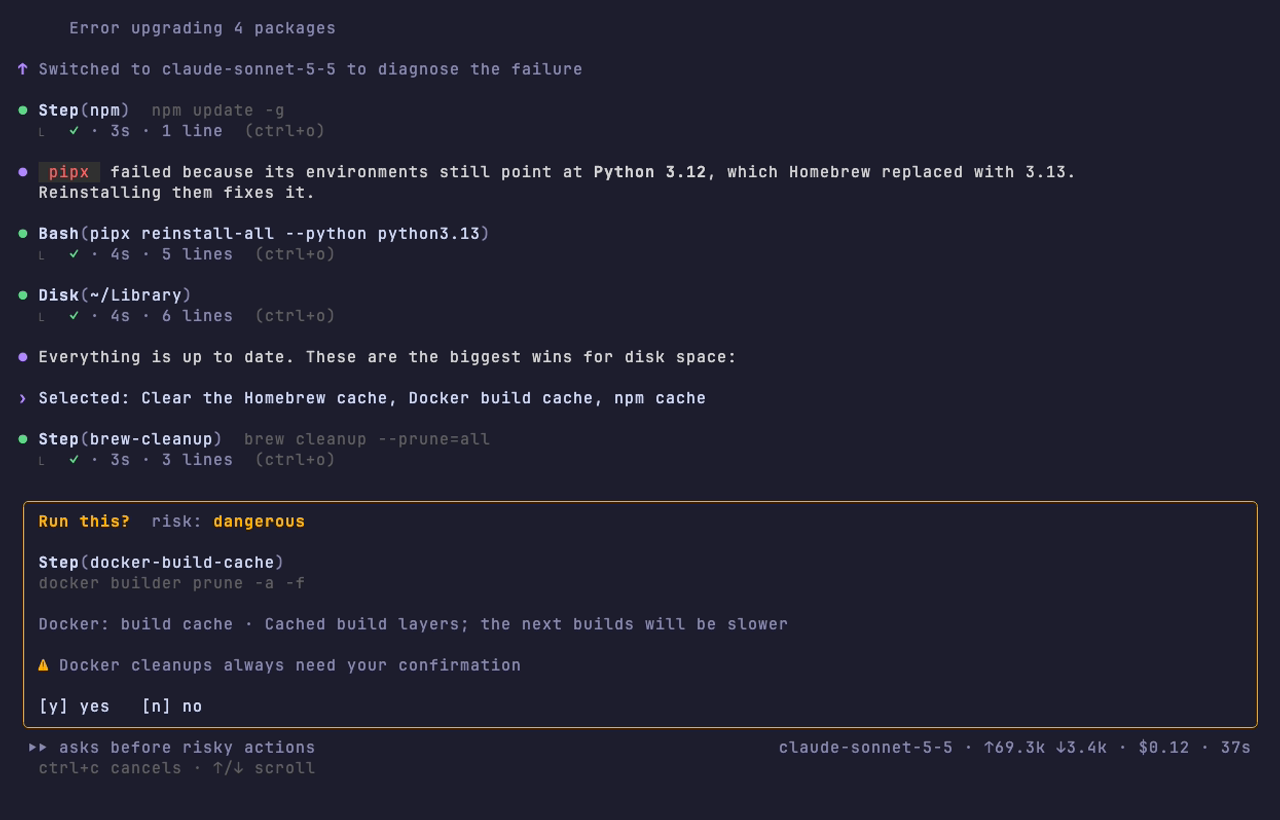
omega docker shows what images, volumes and build cache take, and cleans only what you tick. Docker cleanups always ask you first.

Nothing risky runs without you

Every command is classified before it runs. Deletes and config edits wait for your yes, sudo asks for the password inside the interface, and the truly destructive commands never run.

Running in three commands

  1. 1

    Install and connect a model

    The setup asks for your provider, stores the key in the macOS Keychain and lets you pick a model.

    brew install lcajigasm/omega/omega
    omega setup
  2. 2

    Get a report first

    Analyze mode is read only. You see disk usage, outdated software and config problems before anything changes.

    omega analyze
  3. 3

    Let it do the maintenance

    Updates, cleanup and a summary, with your approval on anything risky. Then tune your tools or free Docker space.

    omega
    omega tune
    omega docker

Drive it from the keyboard

The shortcuts you know from other AI tools in the terminal. Change how much omega may do, or which model it uses, without stopping the run.

Shortcuts

shift tab
Cycle the approval mode: asks before risky actions, auto approve, read only
ctrl p
Switch to the next model of the run, from the next turn
ctrl o
Expand or collapse the output of every tool call
/
Open the command menu
ctrl c
Cancel the run

omega · commands

› /mo

❯ /mode [ask|auto|readonly] approval mode

/model [name] switch model

⏵⏵ auto approve (shift+tab)

/help
all commands
/mode
approval mode
/model
switch model
/expand
tool output
/exit
end the session
Typing /mo shows /mode and /model with their descriptions; Tab completes and Enter runs the highlighted command.

Four risk levels.
You decide on the ones that matter.

Compound commands are split and checked part by part. The highest risk wins.

Read only

Runs straight away

brew outdateddf -htopgrade --dry-run

Normal

Runs straight away

brew upgradenpm update -grustup update

Dangerous

Waits for your approval. Docker cleanups ask every time.

rmsudodocker … prune

Blocked

Never runs, even with --yes

rm -rf ~diskutil erasecurl … | sh
  • Commands run with stdin closed, so nothing hangs on a hidden prompt
  • Config edits show a diff and keep a timestamped backup
  • Every run is logged, including what you approved and denied

The model you trust, at the size the job needs

Automatic by default: a fast model for routine work, a stronger one when something fails. Pin any model with omega model, or switch mid-run with ctrl p.

Anthropic

Official Go SDK with conversation caching.

claude-haiku-5-5 → claude-sonnet-5-5

OpenAI

Chat Completions with tool calling.

gpt-5.4-mini → gpt-5.5

OpenRouter

Hundreds of models behind one key.

anthropic/claude-haiku-5.5 → sonnet

OpenCode Zen

Claude, Qwen, GLM, Kimi and more.

claude-sonnet-4-6

Ollama and LM Studio

Fully local and free. Nothing leaves your Mac but the docs it reads.

qwen3:14b · any model with tools

Any compatible endpoint

MLX, llama.cpp, vLLM or a company gateway through a base URL.

provider = "custom"

Built in the open

43

maintenance steps, from Homebrew to Docker

12

narrow tools the agent can use, nothing more

5

interface languages, checked by tests

<1¢

for a typical run on the automatic model

Read every line before you run it: github.com/lcajigasm/omega

Questions

Does omega replace topgrade and Mole?

For a typical developer Mac, yes. omega has its own steps for Homebrew, the Mac App Store, npm, pnpm, bun, pipx, uv, rustup, cargo, gh extensions, Oh My Zsh, macOS, caches, Xcode, Docker and the Trash. If topgrade or Mole are installed, it also uses them and can fix their configuration with omega fix.

What does omega send to the AI provider?

Its instructions, the trimmed output of the commands it runs and the configuration files it reads. It is instructed never to open your documents. Every run is logged to ~/.local/state/omega/runs so you can check exactly what happened.

Can omega delete my files?

Only after you approve it. Deleting, sudo, editing config files and any unknown command need your confirmation. Commands like rm -rf ~, diskutil erase or curl piped into a shell are blocked and never run, even with --yes.

Which AI models work with omega?

Any model with tool calling from Anthropic, OpenAI, OpenRouter or OpenCode Zen, or a local one through Ollama, LM Studio or any OpenAI compatible endpoint. By default omega uses a fast model such as Claude Haiku 5.5 and switches to a stronger one when a step fails. Choose with omega model.

Can I change the mode or the model during a run?

Yes. shift tab cycles between asking before risky actions, auto approve and read only, and ctrl p switches to the next model of the run. In the input box, type / for commands such as /mode, /model and /exit: a menu explains each one as you type. A model you pick by hand is kept for the rest of the run.

How much does a run cost?

On the automatic model a typical run costs under one cent: a full configuration review on a real Mac came to $0.009. omega shows tokens and cost live in the status bar and in the final summary. Local models cost nothing.

Can it run on a local model?

Yes. Start Ollama or the LM Studio server and pick the provider in omega setup. Apple Intelligence's on device model is only reachable from Swift and its 4,096 token context is too small for this kind of agent, so omega uses local servers instead.

How does omega tune know the right settings?

It does not ship a fixed list. For each tool you have installed it gets pointers to the config files and the official docs, reads the current documentation on the web, and proposes changes with their source. You pick which ones to apply, or use --auto for the low risk ones.

Can omega run unattended?

Yes. Run omega update --yes --no-tui --once from launchd or cron. Blocked commands stay blocked, Docker is never cleaned without you, and recommendations go into the summary instead of a card.

What happens when something needs admin access?

Commands run detached from your terminal, so nothing can write over the interface. When a tool such as Mole or softwareupdate asks for sudo, omega shows a password card, checks the password with sudo and keeps it in memory for that run only. It is never logged or sent to the AI. Press Esc to skip the steps that need it.

Where are my API keys stored?

In the macOS Keychain, under the service omega-cli. Environment variables such as ANTHROPIC_API_KEY take precedence when set.

Which languages does the interface support?

English, Spanish, French, German and Portuguese. omega follows your system locale, and you can override it with omega config set language. The agent replies in the same language.

Start with a report that changes nothing

Free and open source under the MIT license. omega analyze is read only, so you can see what it would do before you let it do anything.

brew install lcajigasm/omega/omega