
The Terminal That
Belongs To You.
OwnTerm is a modern, GPU-accelerated terminal emulator and intelligent coding assistant. No sign-ins, zero telemetry upload, and direct tool calling with your own LLMs (Ollama, vLLM, LM Studio, OpenAI, xAI).
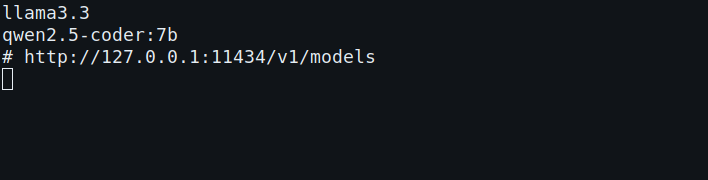
ownterm-tui models --provider ollama, captured from the real binary by script/capture-ownterm.sh. The macOS disk image opens the same terminal in OwnTerm.app.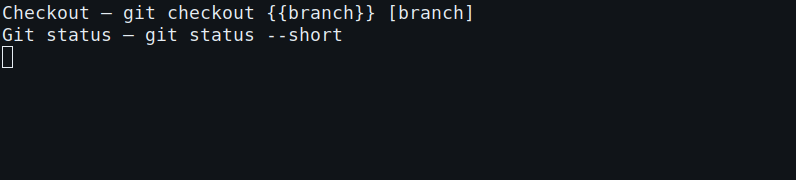
ownterm-tui workflow list, captured from the real binary. Those commands are files in ~/.ownterm/workflows.Built for Speed, Privacy, and Control
Everything you love about modern block-based terminals, freed from commercial servers.
100% Private & Offline
No accounts, no sign-ins, and zero analytics packets. OwnTerm works entirely offline without reaching out to any cloud telemetry service.
Auto mode
Set the model to auto. OwnTerm classifies the prompt locally and calls the cheapest catalog model that fits, including a $0 local server when it is up. A failure before any output tries the next candidate. Settings and the transcript say which model was chosen and why. A session pin forces one model without changing the default.
Bring Your Own Model (BYOM)
Connect directly to Ollama, vLLM, LM Studio, OpenAI, xAI, OpenRouter, or Groq. Set OWNTERM_PROVIDER and OWNTERM_MODEL. With no provider, OwnTerm asks you to configure one instead of showing Warp credits. ownterm-tui workflow add writes a command workflow under ~/.ownterm/workflows. Command search and the / menu load it. Warp Drive is not involved.
Native Tool Calling
The assistant runs shell commands, reads files, greps, globs, and applies a search-and-replace diff in your terminal. Search stays on this machine, and a diff still waits for confirmation.
GPU-Accelerated Rendering
Hardware acceleration with Metal and OpenGL ensures instant startup, low latency keystrokes, and buttery-smooth 120 FPS scrolling.
Keys stay in the environment
Settings stores the provider, model, base URL, and the name of the environment variable. The API key itself is never written to provider.env.
GUI & Headless TUI
Use the beautiful graphical desktop app on your workstation, or deploy the lightweight ownterm-tui binary on remote SSH servers.
Get Started in Seconds
Point OwnTerm to any OpenAI-compatible engine on your machine or cloud.
# 1. Pull and start your local Ollama model
ollama run llama3.3

# 2. Launch OwnTerm with direct local loopback inference
export OWNTERM_PROVIDER="ollama"
export OWNTERM_MODEL="llama3.3"

./script/run# 1. Serve high-throughput model with vLLM
vllm serve Qwen/Qwen2.5-Coder-7B-Instruct --port 8000
# 2. Point OwnTerm to the vLLM server
export OWNTERM_BASE_URL="http://localhost:8000/v1"
export OWNTERM_MODEL="Qwen/Qwen2.5-Coder-7B-Instruct"
./script/run# 1. Start Local Server in LM Studio (default: port 1234)
# 2. Run OwnTerm with your selected LM Studio model
export OWNTERM_BASE_URL="http://localhost:1234/v1"
export OWNTERM_MODEL="qwen2.5-coder-7b-instruct"
./script/run# xAI, OpenAI, OpenRouter, or Groq. The key stays in the environment.
export OWNTERM_PROVIDER="xai"
export OWNTERM_MODEL="grok-3"
export OWNTERM_API_KEY="xai-..."
./script/run# Run headless console TUI for SSH sessions, tmux, or containers
./script/run-tui
# Or run compiled standalone binary directly
ownterm-tuiDownload Releases
Precompiled binaries for macOS, Linux, and Windows. The Mac disk image contains OwnTerm.app.
From a checkout, bash script/install-ownterm.sh installs or updates ~/.local/bin after checking SHA256SUMS.
The usage guide covers first launch, the Settings provider form, and local workflows.
How OwnTerm Compares
A true open alternative for developers who demand complete sovereignty.
| Feature | OwnTerm | Upstream Warp | Alacritty | Ghostty | WezTerm | Kitty |
|---|---|---|---|---|---|---|
| Account / Login Required | ✕ Never | ✓ Mandatory | ✕ Never | ✕ Never | ✕ Never | ✕ Never |
| Telemetry & Tracking | ✕ Zero | ✓ Always on | ✕ Zero | ✕ Zero | ✕ Zero | ✕ Zero |
| Local LLM Support (Ollama / vLLM) | ✓ Native 1st-Class | ✕ Cloud only | ✕ None | ✕ None | ✕ None | ✕ None |
| Agent Tool Calling & Execution | ✓ Built-in | ✓ Cloud subscription | ✕ None | ✕ None | ✕ None | ✕ None |
| Block-Based Shell Architecture | ✓ Yes | ✓ Yes | ✕ Classic grid | ✕ Classic grid | ✕ Classic grid | ✕ Classic grid |
| GPU Acceleration | ✓ Metal / GL | ✓ Metal / GL | ✓ OpenGL | ✓ Metal / GL | ✓ GL / Vulkan | ✓ OpenGL |
| Headless TUI Included | ✓ Yes (`ownterm-tui`) | ✕ No | ✕ No | ✕ No | ✕ No | ✕ No |
| Open Source License | ✓ AGPLv3 / MIT | Partial / Closed services | ✓ Apache 2.0 | ✓ MIT | ✓ MIT | ✓ GPLv3 |